Commander Gear: Equipment and Supplies
Equipping your Commander with the right gear is essential to maximizing their combat and economic output. Whether you are leading a massive rally or gathering resources, customizing your Commander's loadout allows you to tailor their stats to fit your exact strategy.
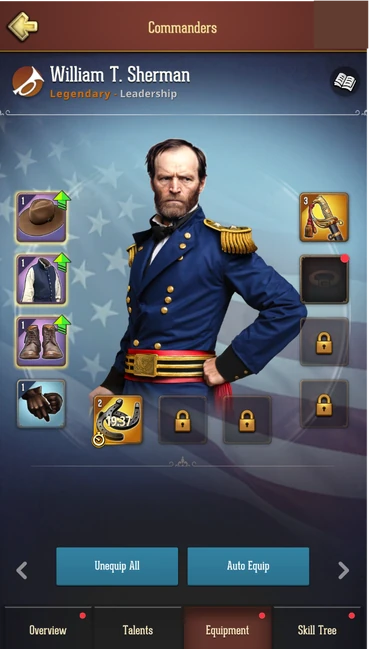
You can view and manage all of your Commander’s equipment and supplies in the dedicated Equipment tab on your Commander's profile screen.
PRO TIP: Save Time with Presets! Because gear can only be equipped on one Commander at a time, constantly passing the same pair of boots back and forth between Commanders can get tedious. Use the Commander Presets feature in the Overview tab to save your favorite loadouts.
Equipment Types & Management
By default, Commanders have 6 primary equipment slots:
- Hat
- Coat
- Boots
- Gloves
- Weapon
- Accessory
(Note: You can unlock 2 additional equipment slots by completing the corresponding research in College and the Academy).
Every piece of gear, whether it belongs to a specific set or stands alone, is inspired by historical Civil War items. You will find a wide variety of authentic uniforms, sabers, pistols, and rifles to collect and equip!
The Equipment tab is designed for quick management. With your Commander’s portrait front and center, you can instantly consult the active bonuses for your currently equipped items. Tap on an Equipment piece to equip a specific Equipment or upgrade it.
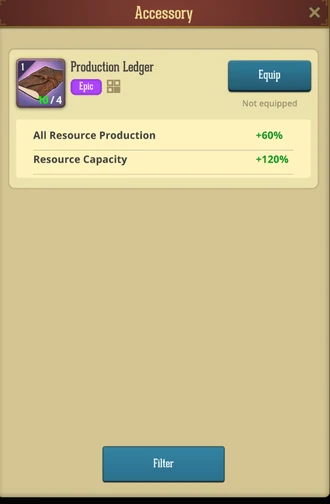
To speed up loadout changes, you can use the Auto Equip and Unequip All buttons.
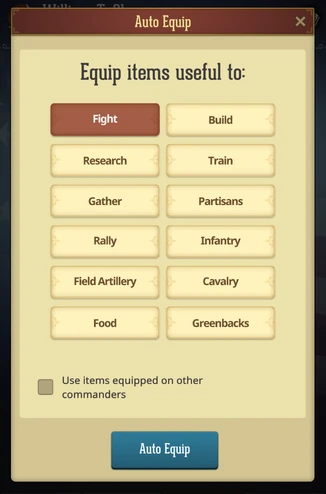
Unique Equipment Assignment
You can only equip a specific piece of gear on one Commander at a time, regardless of how many duplicate parts you have in your inventory. For example, even if you own 35 parts for a Level 1 Assault Commander's Saber, the game treats the Saber itself as a single item. If William T. Sherman is currently wearing the Assault Commander's Saber, you cannot equip it on Robert E. Lee. You must completely unequip it from Sherman before it becomes available for another Commander.
How to Obtain Equipment
You can acquire new gear and the parts needed to upgrade them through several methods:
- Equipment Wagons: Open these to receive a random assortment of equipment parts.
- Event Rewards: Participate in daily, weekly, and seasonal events to earn valuable gear.
- The Store: Keep an eye out for special deals and bundles to purchase equipment directly.
Upgrading Equipment
To maximize a piece of equipment's bonus, you can upgrade it up to Level 6.
To upgrade an equipment:
- Navigate to the Equipment tab on your Commander screen.
- Select the specific piece of equipment you want to improve and tap the Upgrade button.
- Choose the target level you wish to upgrade to.
- Select your upgrade method: you can choose a regular upgrade (which takes time to complete) or an instant upgrade (which costs a Gold fee to bypass the timer).
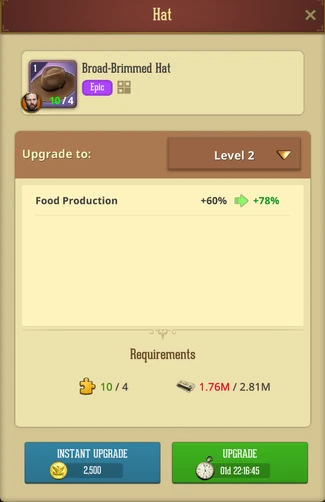
Regardless of whether you choose the regular or instant method, upgrading always requires a specific amount of Equipment Parts and Greenbacks.
Supplies
While Equipment provides permanent stat boosts, Supplies are special, temporary items that give your Commander massive, time-limited buffs.
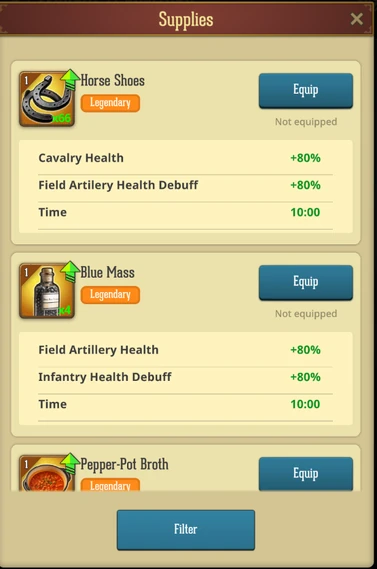
Like standard gear, there is a wide variety of Supplies available, and they can also be upgraded up to Level 6 for maximum efficiency. By default, your Commander has limited supply capacity, but you can unlock 2 additional supply slots by researching the corresponding technology in College and the Academy, allowing you to run multiple boosts simultaneously.
How to Obtain Supplies
You can stockpile these powerful temporary buffs through:
- Supplies Chests: Opening these will grant you a random assortment of supplies.
- Choice Chests: These special and premium chests are highly valuable, as they allow you to manually choose exactly which supplies you want to receive.
- Event Rewards: Earned by completing various event objectives.
- The Store: Available for purchase through special deals.
⚠️ How Supply Timers Work: Once you equip a Supply, it immediately activates and its countdown timer begins.
⚠️ Important: If you unequip an active Supply, its timer does not pause. The buff is removed from your Commander, but the item's duration will continue to run down in your inventory until it expires.
⚠️ Warning: Merging Supplies - Be very careful when unequipping active Supplies. If you unequip a running Supply while you already have another active Supply of the exact same type and level in your inventory, the game will automatically merge the two items together, combining their remaining timers into one.
Crafting Supplies
Unlike equipment, improving your supplies is known as Crafting. You can craft supplies up to Level 6 for maximum efficiency.
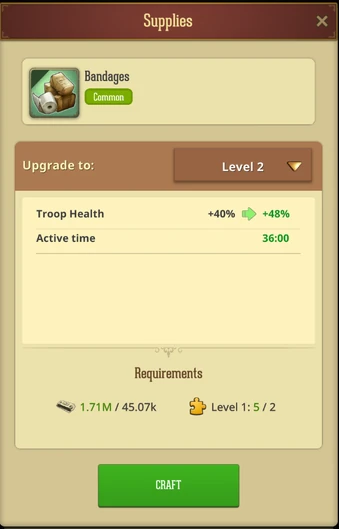
To craft a higher-level supply:
- Tap on a Supply slot on your Commander's screen.
- Tap the Craft button.
- Choose the specific supply you'd like to craft (you must already have enough Supply Parts for that specific item).
- Select your target level.
- Tap Craft and pay the required Greenbacks cost.
No Timers: Unlike upgrading equipment, there is no waiting period for supplies. The item is crafted instantly!
Was this article helpful?
That’s Great!
Thank you for your feedback
Sorry! We couldn't be helpful
Thank you for your feedback
Feedback sent
We appreciate your effort and will try to fix the article