Troops
Troops are the backbone of your army in the game. Each troop type has unique strengths, weaknesses, and tiers, allowing players to create diverse armies and strategic combinations. By training and upgrading troops, you can strengthen your forces, unlock more advanced units, and gain an edge in battles.
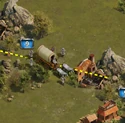
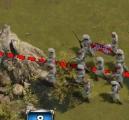
Troops are divided into four main types, Infantry, Field Artillery (Ranged), Cavalry, and Siege; and each type has multiple tiers that increase in power and effectiveness as you progress through the game.
Types of Troops
There are four types of troops in the game, each with six tiers that increase in strength and abilities.
- Infantry
- Field Artillery (Ranged)
- Cavalry
- Siege
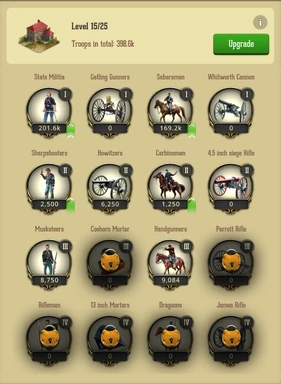
After a corresponding Troop Tier Research in University is complete, each troop type can be trained from scratch or upgraded from Tier 1 to Tier 6 as described in the Troop Tiers section below.
1. Infantry
- Type: 1
- Strong against: Cavalry, Siege
- Weak against: Field Artillery
Tiers:
- Tier 1 → State Militia
- Tier 2 → Sharpshooters
- Tier 3 → Musketeers
- Tier 4 → Riflemen
- Tier 5 → Enfield Rifle-Musketeers
- Tier 6 → Veteran Infantry
2. Field Artillery
- Type: 2
- Strong against: Infantry, Siege
- Weak against: Cavalry
Tiers:
- Tier 1 → Gattling Gunners
- Tier 2 → Howitzers
- Tier 3 → Coehorn Mortar
- Tier 4 → 13 inch Mortars
- Tier 5 → M1841 24pdr. Mortar
- Tier 6 → 15 Inch Roadman Gun
3. Cavalry
- Type: 3
- Strong against: Field Artillery, Siege
- Weak against: Infantry
Tiers:
- Tier 1 → Sabersmen
- Tier 2 → Carbinemen
- Tier 3 → Handgunners
- Tier 4 → Dragoons
- Tier 5 → Spencer Riflemen
- Tier 6 → Elite Units
4. Siege
- Type: 4
- Weak against: Infantry, Field Artillery, Cavalry
Tiers:
- Tier 1 → Whitworth Cannon
- Tier 2 → 4.5 inch Siege Rifle
- Tier 3 → Parrott Rifle
- Tier 4 → James Rifle
- Tier 5 → 10 Inch Columbiads
- Tier 6 → Seacoast Gun
Troop Tiers
Troops in the game are divided into tiers based on their strength and abilities.
- Tier 1 Troops: These are the default units available to all players at the start of the game.
- Tier 2–5 Troops: These can be unlocked in the College building by completing the prerequisite research in the Military Research tree. Once unlocked, they become available for training in the Barracks.
- Tier 6 Troops: These are the highest-level troops and can be unlocked in the Academy building, which becomes available after your College reaches level 21.
By progressing through these tiers, players can strengthen their armies and unlock more advanced strategies in battle.
How to Train Troops
Training troops is essential to building a strong army.
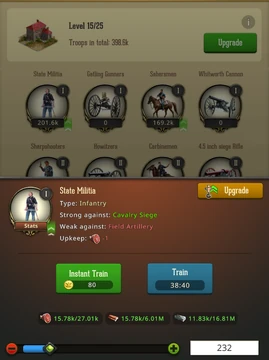
To train your units, follow these steps:
- Open the Barracks in your city.
- Select a troop type you want to train (Infantry, Field Artillery, Cavalry, or Siege).
- A training pop-up will appear, where you can choose the number of troops to train.
- After selecting the quantity, you will see details about the training cost and duration.
Tip: Planning your training according to your resources and ongoing battles can help maximize your army’s effectiveness.
Upgrading Troops
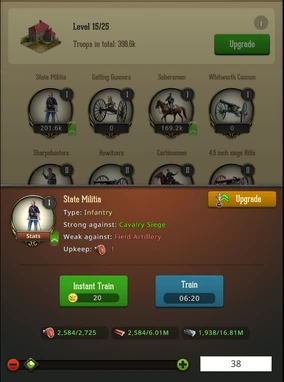
The game allows you to upgrade your lower-tier troops to your highest unlocked tier, making them stronger and more efficient in battle.
How to Upgrade Troops
- Go to the Barracks and look for the green arrow next to the lower-tier troops.
- Click the troop you want to upgrade.
- Press the Upgrade button at the top right.
- Choose the number of troops to upgrade and press Upgrade.
Important notes:
- You can only upgrade troops to your highest unlocked troop tier. For example, if you have unlocked Tier 3 troops, you can upgrade Tier 1 or Tier 2 directly to Tier 3. Also, only one troop type can be upgraded at a time.
- While an upgrade is in progress, you cannot train troops. Only one troop action (train or upgrade) can be active at a time.
- Training speed-ups can be used to speed up troop upgrades.
- Upgrading troops awards points in the Train Event and other events where training troops grants points.
- The cost to upgrade is calculated so that the total cost of training and upgrading equals the cost of training the higher-tier troop directly.
March Presets
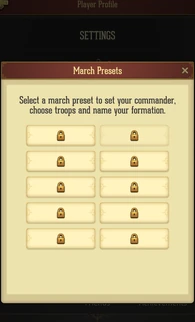
March Presets allow you to save different troop assignments for your marches, making it easier to switch between strategies such as attacks, gathering resources, or rebel assaults.
How to Unlock March Presets
To unlock March Presets, you need to complete the following research in your College:
- March Slot Level 1
- Equipment Slot Level 1
- Commander Preset Level 1
Once these are completed, you can research March Preset in the College to unlock the feature.
Where to Find March Presets
- Tap on your Avatar to acces Player Profile > Settings > March to view and manage March Presets.
How to Save a March Preset
- Assign the desired number of troops with your preferred setup.
- Tap Save March Preset in the upper-right corner of the screen.
How to Change a March Preset
- Purchase the Reset March Preset item from the Alliance Store.
- Open the item and use the Reset March Preset option in the upper-left corner of the screen.
Tip: Using March Presets effectively allows you to quickly switch between multiple strategies without manually reassigning troops each time.
Was this article helpful?
That’s Great!
Thank you for your feedback
Sorry! We couldn't be helpful
Thank you for your feedback
Feedback sent
We appreciate your effort and will try to fix the article